
Contactless Loyalty for a UK Cafe With a Queue at Peak Times: QR, NFC and Receipt Scanning Compared

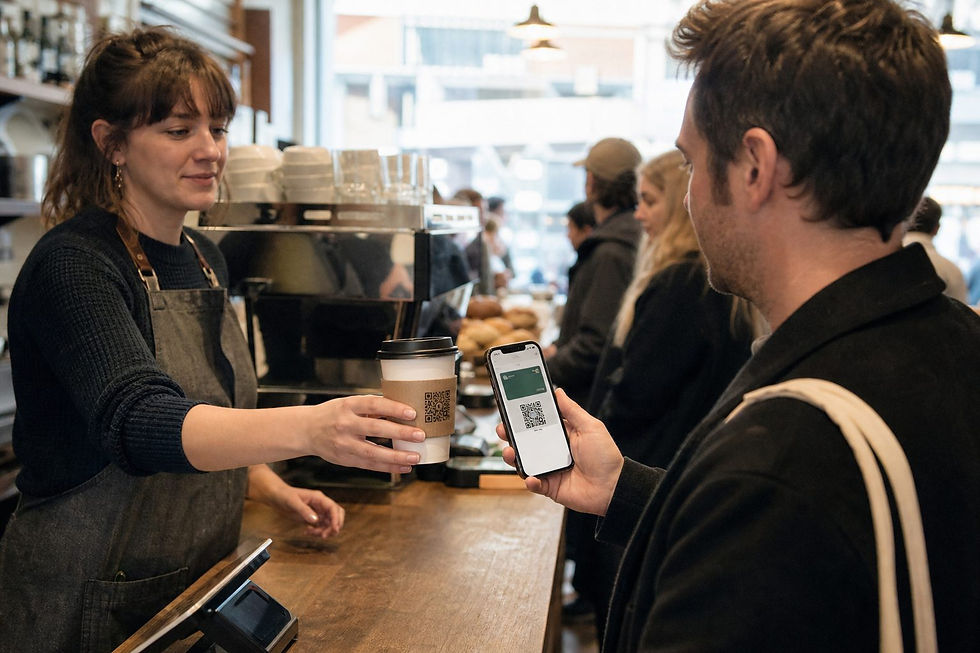
For a UK cafe with a queue out the door at 8:15am, the fastest contactless loyalty check-in is NFC tap, followed by QR code scan, with AI receipt scanning as the slowest at the counter but the only method needing zero staff action. Contactless payments already account for 94.6 percent of eligible in-store card transactions in the UK, so your customers are primed for tap-based interactions. The question isn't whether to go contactless. Which mechanic survives your actual queue is what matters.
TL;DR
NFC tap-in is the fastest check-in method at the counter, completing in under a second once a phone is near the reader, because it uses radio communication instead of a camera scan.
QR codes are close behind and need no extra hardware, but they depend on the customer's camera app cooperating under pressure.
AI receipt scanning removes staff involvement entirely and works well for takeaway, but the reward isn't instant, since the customer scans their receipt after leaving the counter.
The right method depends on your setup: a single till with a long queue wants NFC or receipt scanning, a counter-plus-tables cafe can support QR at the table, and a cart needs whatever asks the least of the operator.
Apple Wallet and Google Wallet loyalty cards remove the need for a dedicated app, which matters more at peak times than any single feature, because friction at 8am costs you the sign-up entirely.
About the Author: This article is published by meed, a digital loyalty platform used by independent cafes, salons and studios across the UK and internationally, built around AI receipt scanning, NFC check-in and wallet-native stamp cards designed specifically to avoid slowing down a counter during a rush.
What Makes a Loyalty Method "Fast Enough" for a Peak-Time Queue?
A loyalty method is fast enough for peak times if it adds no more than a couple of seconds to a transaction the customer was already completing. That's the whole test. Anything that requires a separate step, a new app, or a staff member stopping to explain something fails it immediately, no matter how good the loyalty mechanics are behind it. UK cafes see their heaviest traffic during the morning commuter rush and the lunchtime office crowd, and during those windows customers already lean toward self-service and contactless payment because it visibly moves the queue faster. A loyalty check-in that fights that instinct gets skipped, and a skipped loyalty step trains customers to skip it every time after.
The practical way to judge a method isn't "does it work" in a demo. What matters is whether it survives being the fourth thing in a five-second transaction, done by someone who didn't ask for extra steps.
How Fast Is NFC Tap-In Compared to a QR Code Scan?
NFC is the faster of the two at the physical point of contact, because it uses short-range radio communication rather than a visual scan. NFC operates at 13.56 MHz with a range of up to 4cm and transfers data at 106, 212 or 424 Kbps, which in practice means a phone held near a reader registers in a fraction of a second. QR codes require the phone's camera to focus, read the pattern, and open a link or app, a process that takes a few seconds even when it goes right, and longer if the phone's camera struggles with counter lighting or a scratched sticker.
The catch with NFC is device compatibility. Roughly 85 to 94 percent of smartphones in active use are NFC-enabled, but Android and iOS treat that hardware differently. Android generally allows open NFC read and write access for third-party apps. Apple's iOS has historically kept NFC functionality tied closely to Apple Wallet and Apple Pay, which is precisely why a wallet-native NFC check-in, like Checkin by meed, works on both platforms without asking the customer to install anything separately. QR codes sidestep the compatibility question completely, since any smartphone camera can read one, which is why they remain the more universal fallback even where NFC is faster.
How Does AI Receipt Scanning Compare for Speed and Staff Effort?
Receipt scanning is the slowest method at the counter, and it's meant to be, because it happens after the transaction rather than during it. The customer pays as normal, gets a receipt, and scans it later using their phone camera, at which point AI reads the receipt and applies the stamp or reward automatically. Scan by meed works this way, and the trade-off is direct: zero seconds added to the till interaction, in exchange for the reward not being instant.
That trade-off suits specific queue shapes better than others. A single barista running both till and machine during an 8am rush cannot spare attention for a loyalty step, no matter how quick. Receipt scanning asks nothing of that barista. It also needs no point-of-sale integration, since it reads the printed receipt rather than pulling data from the till system, which matters for cafes running older or simpler POS setups that were never built to support loyalty add-ons.
QR, NFC or Receipt Scanning: Full Comparison Table
The three mechanics solve different parts of the same problem. The table below lines them up against the constraints that actually matter during a queue.
Method | Seconds at counter | Staff involvement | Works without POS? | Works for takeaway? | What can fail |
NFC tap | 1-3 seconds | Minimal, customer taps unprompted once trained | Yes | Yes | Reader placement awkward for a moving queue, older Android NFC settings disabled, first-time customers unsure where to tap |
QR code | 3-6 seconds | Low, may need a verbal prompt for first-timers | Yes | Yes | Poor lighting or camera focus, printed code damaged or too small, customer's camera app defaults to the wrong scanner |
AI receipt scanning | 0 seconds at counter (done afterward) | None | Yes | Yes, arguably the best fit | Faded thermal receipts, customer forgets to scan before binning it, receipt format changes confusing the reader |
None of these figures include a specific vendor-tested benchmark; they're presented as practical ranges based on how each mechanic physically works, not a lab measurement.
Which Method Should You Use, by Cafe Layout?
The comparison above only matters once it's applied to your actual counter. Layout changes everything about which mechanic survives a queue.
Single till with a queue: NFC tap or receipt scanning. A single till means one person is doing everything, taking payment, calling out orders, restocking cups. NFC adds almost nothing if the reader sits right by the card machine. Receipt scanning adds literally nothing, since it happens after the customer walks away. QR is workable but riskier here, since it's the method most likely to stall if a customer's phone hesitates.
Counter plus tables: QR code check-in, optionally paired with NFC at the counter. Table service gives customers a slower moment to scan a QR code left on the table or receipt, without holding up anyone behind them. This is the layout where QR earns its keep, because the time pressure that hurts it at a single till doesn't exist at a table.
Cart or kiosk with no fixed counter: Receipt scanning first, NFC second if a card reader is already part of the payment setup. A cart has no space for a second device and often no reliable connectivity for a live NFC reader tied to a POS. A printed or emailed receipt customers scan later removes that constraint entirely.
How Does Digital Loyalty Fit Into UK Cafe Loyalty Programs Generally?
Digital loyalty cards are, at their simplest, a direct replacement for the paper stamp card, stored on a phone instead of in a wallet, and the mechanics discussed above are just different ways of getting a stamp onto that digital card. Coffee shop loyalty cards remain one of the most requested features from independent cafe owners because the reward structure is instantly understood by customers, buy a set number, get one free, without needing any explanation [brewstamp.app]. Digital versions solve the two problems paper cards always had: a lost card resets a customer's progress to zero, and a stamp can be given without a purchase actually happening [baristacard.com]. A wallet-based loyalty card sitting in Apple Wallet or Google Wallet can also trigger location-based nearby notifications. Apple Wallet can trigger a lock screen notification based on pass value changes or contextual relevance, and supports up to 10 relevant locations per pass. Google Wallet caps push notifications at three per pass within 24 hours and requires the customer to have granted precise, always-on location access for nearby alerts to fire at all. Nearby notifications are wallet-triggered alerts available on both meed's Free and Pro plans, separate from custom notifications, which are business-initiated messages sent on demand and available only on meed Pro. Where Does meed Fit Into This Comparison? meed supports all three mechanics discussed in this article under one loyalty card: NFC tap-in through Checkin by meed, QR code enrollment and check-in, and receipt scanning through Scan by meed that reads a receipt and applies the reward without needing any connection to the cafe's point-of-sale system. The loyalty card itself is integrated directly into Apple Wallet or Google Wallet, so a customer enrolling during a queue doesn't need to download anything, they scan a QR code once, and the branded stamp card sits on their phone from that point on. For a cafe just getting started, meed's free plan covers the core mechanics, digital stamp cards, QR enrollment, wallet integration and nearby notifications, for up to 50 members, which suits a single-site cafe testing whether digital loyalty gets used at all. A cafe running custom, business-initiated messages ("your stamp card resets in 3 days" style alerts) or wanting member, location and campaign-level analytics needs meed Pro, priced at $59/month or $590/year with the first two locations included. That's the honest line between the two tiers: core check-in mechanics are free, active marketing and data are Pro. Frequently Asked Questions What are some contactless loyalty programme ideas for coffee shops? The most common structures are a digital stamp card (buy 8, get 1 free being a standard ratio for UK cafes [brewstamp.app]), a spend-based reward tier unlocked through receipt scanning, and birthday or occasion-based digital coupons. All three can run without a physical card and without a dedicated app, using QR, NFC or receipt scanning as the enrollment and earning method. What are the best contactless loyalty ideas for a UK cafe with a queue at peak times? Prioritise whichever method removes a step from the busiest till, not the one with the most features. NFC tap-in next to the card machine and AI receipt scanning for takeaway customers both add close to zero time to a transaction, which matters more during a morning rush than any bonus mechanic. Is NFC or QR faster for loyalty check-in? NFC is faster at the point of contact, completing in roughly 1-3 seconds because it relies on short-range radio rather than a camera scan, while QR typically takes 3-6 seconds depending on lighting and camera focus. QR remains more universally compatible across devices, which is why many cafes offer both rather than picking one. How do I reward cafe customers automatically when they scan their receipt? AI receipt scanning, like Scan by meed, reads the customer's receipt after purchase and applies the stamp or reward automatically, without needing any integration into the cafe's till system. The customer pays as normal, keeps or photographs the receipt, and scans it at a time that suits them, which is why it fits takeaway and cart-based service particularly well. Does contactless loyalty work without a POS integration? Yes. QR code enrollment, NFC tap-in and AI receipt scanning are all designed to work independently of a cafe's point-of-sale system, which is one of the reasons independent cafes with simpler or older till setups can adopt them without an equipment overhaul. Do customers need to download an app for a digital loyalty card? No, not with a wallet-native platform. A loyalty card built for Apple Wallet or Google Wallet is added directly to the phone's existing wallet app after a single QR scan or link tap, with nothing separate to install or keep updated. What's the difference between nearby notifications and custom notifications? Nearby notifications are triggered automatically by location through Apple Wallet or Google Wallet when a customer is near the cafe, and they're available on both meed's Free and Pro plans. Custom notifications are messages the business writes and sends on its own schedule, such as a reminder about an expiring reward, and that capability is reserved for meed Pro. About meed meed is a digital loyalty platform built for independent and small-to-medium businesses, including cafes, restaurants, salons and studios, that need loyalty tools which work from day one without an app, a POS integration, or a setup process that eats into a working day. The platform combines QR enrollment, NFC check-in and AI-powered receipt scanning under one wallet-native loyalty card, delivered through Apple Wallet and Google Wallet so customers never need to download anything separate. It supports single-site cafes on a free plan covering core features, and scales to multi-location and franchise operators on meed Pro, which adds custom notifications and advanced member, location and campaign analytics. meed's wallet-first approach exists specifically to address the queue-time and app-fatigue problems that come up constantly in cafe and hospitality settings. If your counter needs a loyalty method that survives an 8am queue, take a look at what meed can set up in a few minutes: https://www.meedloyalty.com/. References Coffee Shop Loyalty Cards: 8 Stamps, No App, Free to Start (brewstamp.app) Coffee Shop Loyalty Programs: The 2026 Guide | BaristaCard (baristacard.com)


Comments